Adding Custom Widgets to IMSMA Core
Purpose:
The ArcGIS developer community has developed a variety of widgets that can be used to add functionality to the Web AppBuilder version that ships with ArcGIS Enterprise. These widgets are available through GeoNet, on GitHub, and from various other sources.
ArcGIS Portal 10.6 Upwards
ArcGIS Portal now supports custom widgets, though of course non-ESRI widgets are not supported by ESRI. Custom widgets become available in the built in web app builder, and can be shared with other users of the portal. ESRI have provided a help article to Add Custom Widgets.
Note to add a custom widget it must be hosted on a web server, this can be on the same IMSMA Core server as your portal instance.
ArcGIS Portal < 10.5
At version 10.5 and below, the Portal for ArcGIS product is not intended to support custom widgets, but they can be added through the following workflow. Note that this workflow is not supported by Esri Support.
-
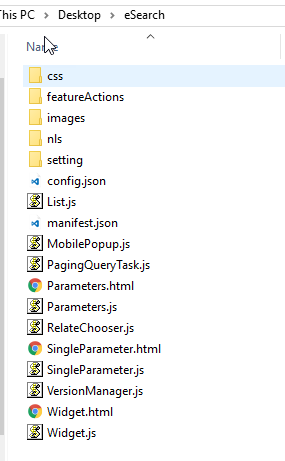
Locate the Widget you want to add, it should be provided as a zip file with a single folder named after the widget. We will refer to this folder as the “widget folder”
-
Copy the widget folder to C:\Program Files\ArcGIS\Portal\apps\webappbuilder\stemapp\widgets
-
Also copy the widget folder to C:\Program Files\ArcGIS\Portal\apps\webappviewer\widgets
-
Edit C:\Program Files\ArcGIS\Portal\apps\webappbuilder\stemapp\widgets\list.json
a. Add “<widgetName>” to the bottom of the list, with a comma after the previous last item, like:
b.
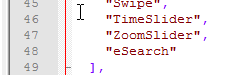
c. The name should match the name of the folder you copied to \widgets
-
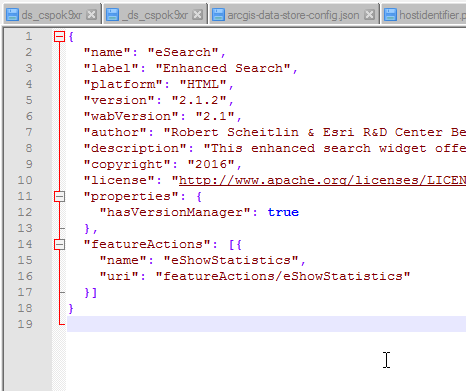
Locate the manifest.json file that should have been included with the custom widget, and copy the text it contains:
-
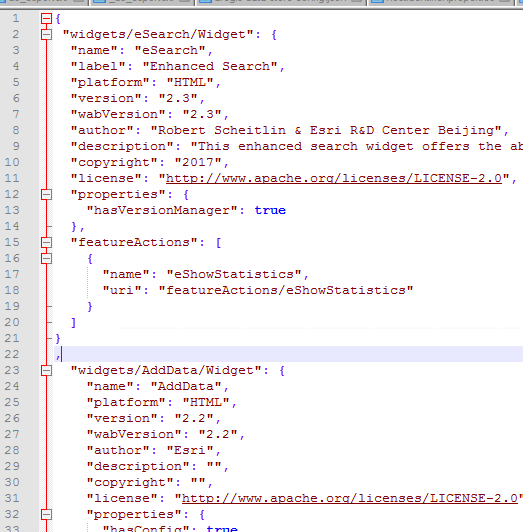
Insert that JSON into the widget-manifest.json file in \webappbuilder\stemapp\widgets
a. Paste the JSON inside the first curly bracket { and include a comma after the last pasted curly bracket }